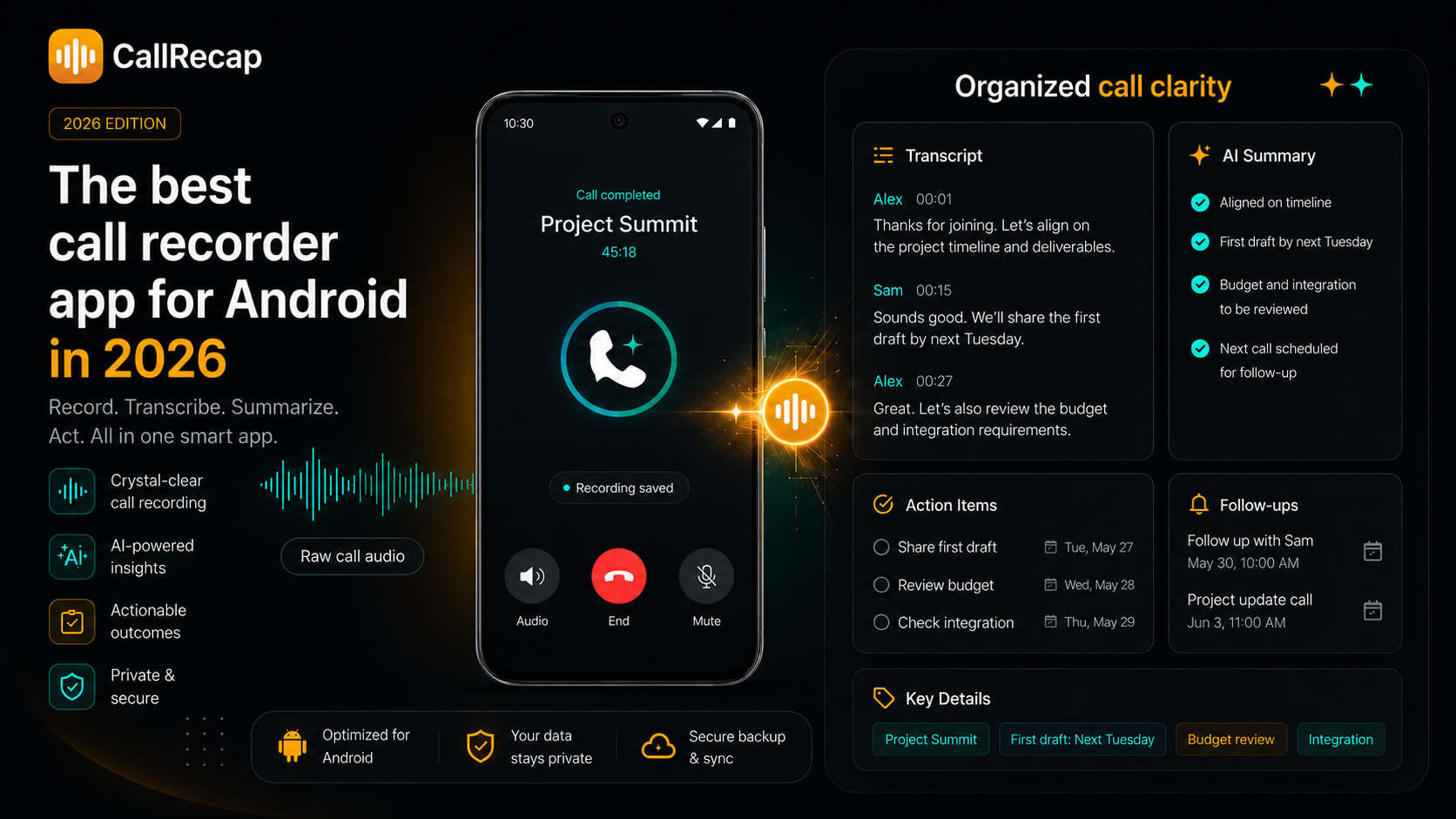
What most call recorder apps for Android actually do
A traditional call recorder app usually gives you:
- Automatic call recording
- An audio file stored on your device
- A list of recorded calls by date or contact
That is useful as a backup. But it also creates a new problem: now you have hours of recordings you will probably never listen to again.
If all you need is proof that a call happened, that may be enough. If you actually need clarity after the call, it is not.
Why recording alone is not enough
Think about the last important phone call you had. Do you really want to replay a full 10 or 15-minute recording just to find:
- One delivery date someone mentioned
- One number that was quoted
- One promise someone made
- One follow-up that matters
Most people do not. The recording gets saved, but the value is still trapped inside the audio.
That is the gap between recording a call and understanding a call.
Traditional vs AI call recorder
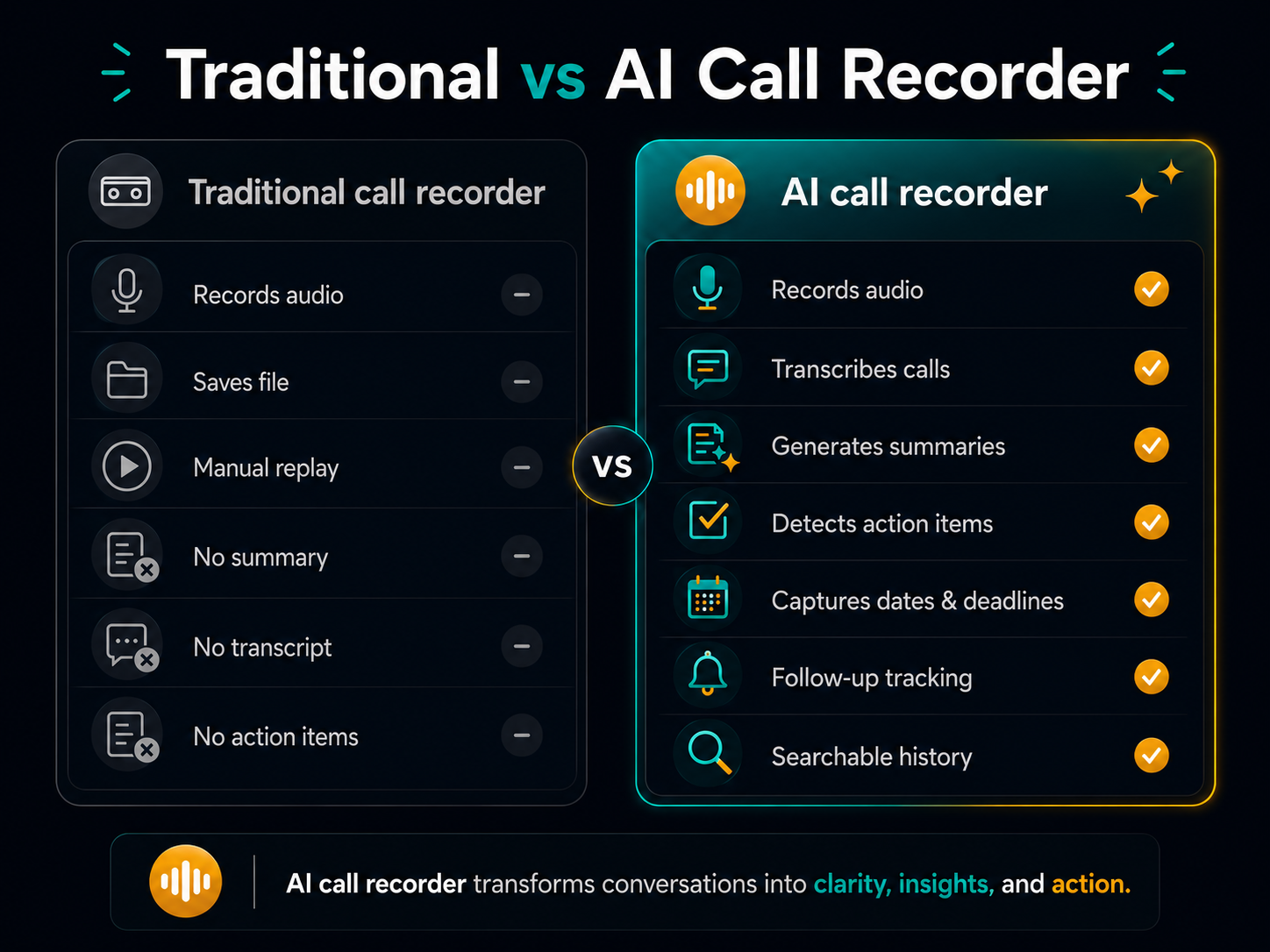
The difference is not the recording itself. The difference is what happens after the call ends.
What to look for in 2026
If you are comparing Android call recorder apps in 2026, these are the features that matter most:
1. Automatic call recording
The app should record calls automatically, both incoming and outgoing, without relying on you to remember a manual step. If you have to press "record" every time, you will miss the calls that matter most.
2. AI transcription
A call recorder with transcription turns raw audio into searchable text. That means you can find details faster without replaying the full conversation.
3. AI summaries and action items
This is where the real value begins. A good AI call recorder should not stop at transcription. It should help you see what was discussed, what was decided, what needs to happen next, and by when.
4. VoIP support (WhatsApp, Telegram)
A lot of important calls now happen on WhatsApp, Telegram, and other VoIP apps. A modern call recorder for Android should support more than regular phone calls.
5. Privacy-first design
Call recordings can contain sensitive information. Look for a solution that is clear about where recordings are stored, how AI processing works, whether audio is retained, and whether your content is used for model training.
6. Searchable call history
It should be easy to find an old call by what was said, not just by date.
7. Multilingual support
If you work or live across multiple languages, transcription and summaries should work without friction.
Red flags to watch for
Before installing any call recorder, rule out apps that show these warning signs.
- Only records one side. If recent reviews on your device mention "only records my voice", any AI summary will be based on half a conversation.
- Manual start required. Apps that need a tap to begin recording will miss calls, especially incoming ones you were not expecting.
- Summary only, no task extraction. A paragraph still has to be read and parsed. Look for apps that pull out tasks, dates and follow-ups explicitly.
- No privacy details. If the app does not explain how recordings are handled, how long data is kept or how you can delete it, do not use it for sensitive calls.
- Requires root. Root-based recording is not practical for most people and creates security risks.
- Unclear pricing. Be careful with apps that hide limits, push unclear trials or make cancellation difficult.
What an AI call recorder should explain about your data
When an app uses AI to summarize calls, the question is not only how powerful the AI is. It is whether the product handles sensitive information responsibly. A trustworthy app should explain:
- what information is processed, and why;
- how it is protected;
- how long it is kept;
- how you can control or delete it;
- which permissions the app needs.
Why CallRecap is more than a recorder
CallRecap is not just a call recorder app. It is built for what happens after the call.
Yes, it records phone calls on Android automatically. Yes, it can work with both regular calls and VoIP flows like WhatsApp and Telegram. But the recording is only the input.
What makes CallRecap different is the output:
- AI transcription — your calls become searchable text
- AI summaries — key decisions and details are organized clearly
- Action item detection — tasks, deadlines, and next steps are extracted automatically
- Follow-up tracking — commitments do not disappear after the call
- Searchable history — find details from past calls fast
- Cloud backup — to your own Dropbox, Google Drive, or OneDrive (Pro)
The recording is the input. The clarity is the output.
Feature comparison
| Feature | Traditional | CallRecap |
|---|---|---|
| Records calls | Yes | Yes |
| Saves audio | Yes | Yes |
| AI transcription | No | Yes |
| AI summaries | No | Yes |
| Action item detection | No | Yes |
| Follow-up tracking | No | Yes |
| Searchable call history | Limited | Yes |
| VoIP (WhatsApp, Telegram) | Sometimes | Yes |
| Clarity after the call | No | Yes |
Recordings are useful. Clarity is better.
See how CallRecap turns recordings into action.
See how it worksHow Android call recorders compare
Here is how the most popular call recorder apps for Android stack up when you look beyond basic recording:
| App | Record | Transcribe | Summary | Actions | VoIP | Free |
|---|---|---|---|---|---|---|
| CallRecap | ✓ | ✓ | ✓ | ✓ | ✓ | ✓ |
| ACR Phone | ✓ | Paid | ✗ | ✗ | ✗ | ✓ |
| Otter.ai | ✗* | ✓ | ✓ | ✓ | ✗ | Limited |
| Notta | ✗* | ✓ | ✓ | ✗ | ✗ | Limited |
| Cube ACR | ✓ | ✗ | ✗ | ✗ | Partial | ✓ |
| Google Recorder | ✗ | ✓ | ✗ | ✗ | ✗ | ✓ |
* Otter.ai and Notta transcribe meetings and voice memos, not phone calls directly.
The key takeaway: most call recorder apps either record without intelligence, or transcribe without recording actual phone calls. CallRecap does both — and adds action item detection on top.
How CallRecap works on Android
From recording to clarity in 5 simple steps:
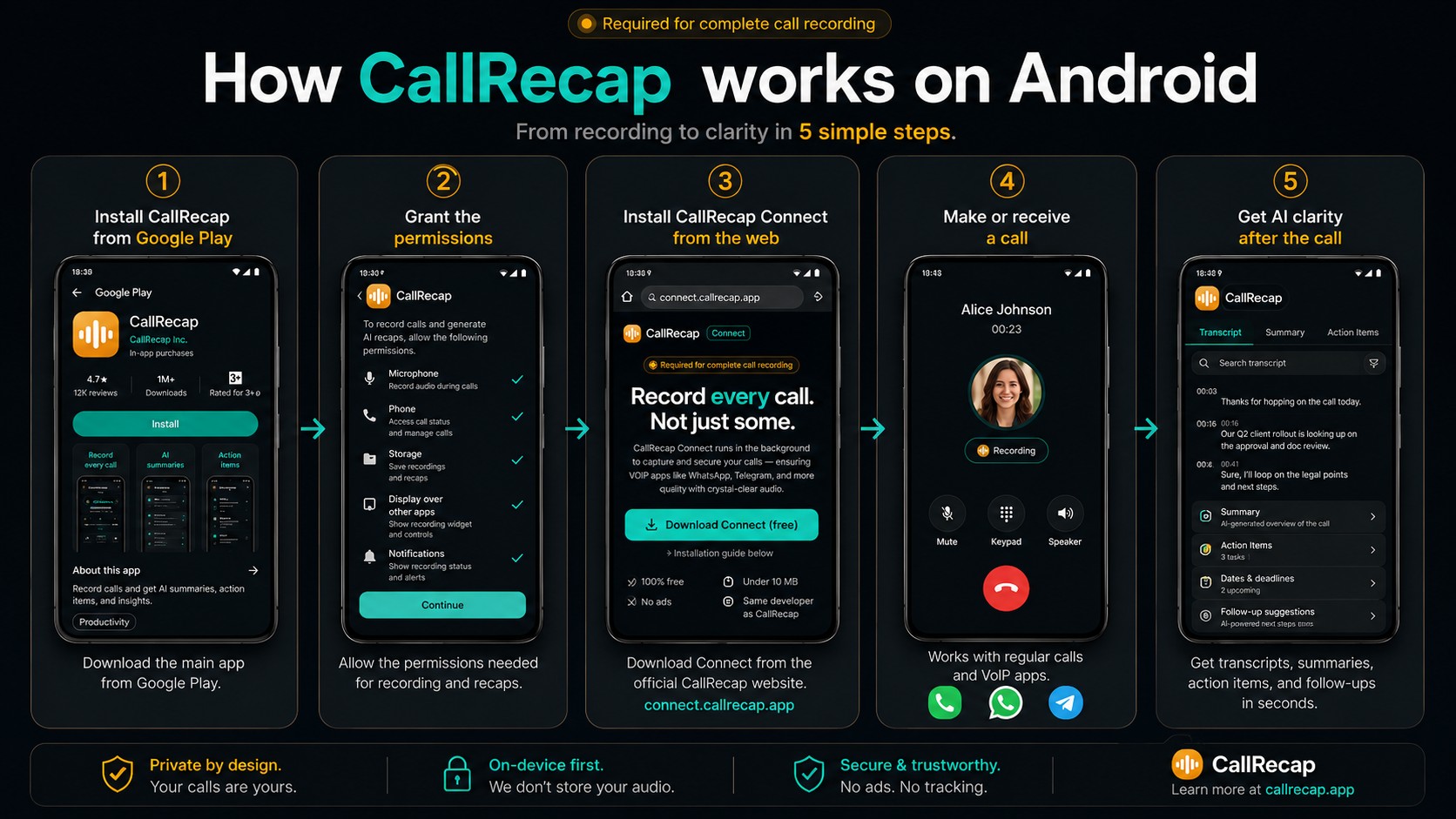
After the call, CallRecap transcribes and analyzes the conversation. Within seconds, you can get a clear summary, detected action items, dates and deadlines, and visible follow-ups.
That means you do not just save calls. You get something useful from them.
On a Samsung Galaxy, see our guide to Samsung call recording. If your recordings only capture your voice, read why a call recorder only records one side.
What matters most
When people compare call recorder apps, it is easy to focus on the wrong things.
- What matters: Does it help after the call ends?
- What matters: Does it create summaries and next steps?
- What matters: Does it work automatically?
- What matters: Does it support real-world calling behavior?
- What matters: Is it private and easy to trust?
- Less important: Minor audio format options
- Less important: Cosmetic settings
- Less important: Technical extras that do not improve post-call clarity
The real question is not "can it record my calls?" — most apps can. The real question is: "Does it help me turn calls into something useful?"
Who should use it
Sales professionals
Capture commitments, next steps, and buyer signals without manual CRM notes.
Freelancers and consultants
Keep client calls organized with summaries, action items, and follow-up tracking.
Mobile-first professionals
If your phone is where work happens, your calls should be easier to review and organize.
Recruiters
Candidate availability, salary expectations, interview timing and next steps stay organized call by call.
Real estate agents
Prices, conditions, timelines and preferences are visible before the next showing or negotiation.
Lawyers and advisors
Client instructions, caveats and conditions mentioned on a call should not depend on memory.
Personal use
Doctor calls, contractor conversations, legal matters, family coordination, school calls — any important call deserves more than memory.
If the call matters, the recap matters.
Running a small business from your phone? Our guide to call recording for small business covers what to capture. If notes are what you are after, see our AI note taker for phone calls guide.
Pricing
CallRecap includes a free tier so you can try it before committing:
- Free: 120 Recap minutes. Includes automatic recording, transcription, summaries, and action items.
- Pro ($14.99/mo) — 600 minutes. Adds cloud backup, reminders, exports, and privacy features.
- Max ($29.99/mo) — 1,800 minutes. Adds deeper analysis: sentiment, objection detection, AI coaching, and semantic search.
All plans are built around the same core promise: record the call, then make it clear. See full pricing details.
Is recording phone calls legal?
Recording laws vary by country and region. Some places allow one-party consent. Others require all parties to agree.
You are responsible for following the laws in your area. When in doubt, inform the other person and check your local regulations. CallRecap does not provide legal advice.
For examples by country and US state, read our guide to call recording laws by country and US state.